Ashby setup
Last updated: June 28, 2026
Hotfix helps candidates find current tech roles and act when a relevant job opens. Connecting Ashby keeps your published jobs in sync and lets eligible roles accept applications directly on Hotfix.
Completed applications arrive in Ashby with the candidate’s resume, screening answers, and Hotfix source attribution attached.
Set up the Hotfix integration
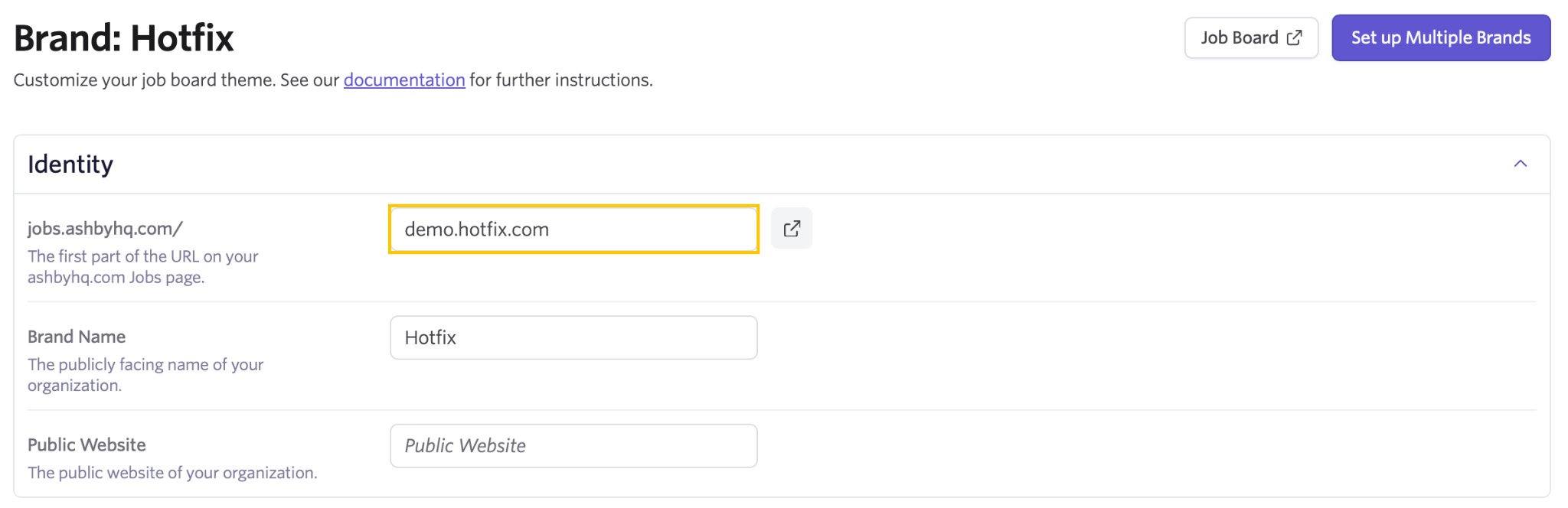
Locate your job board slug
In Ashby Admin: Admin > Job Boards > Theme (Job Board). The slug is the subdomain of your jobs.ashbyhq.com URL. For example, the slug for jobs.ashbyhq.com/acme is acme.
Generate an API key
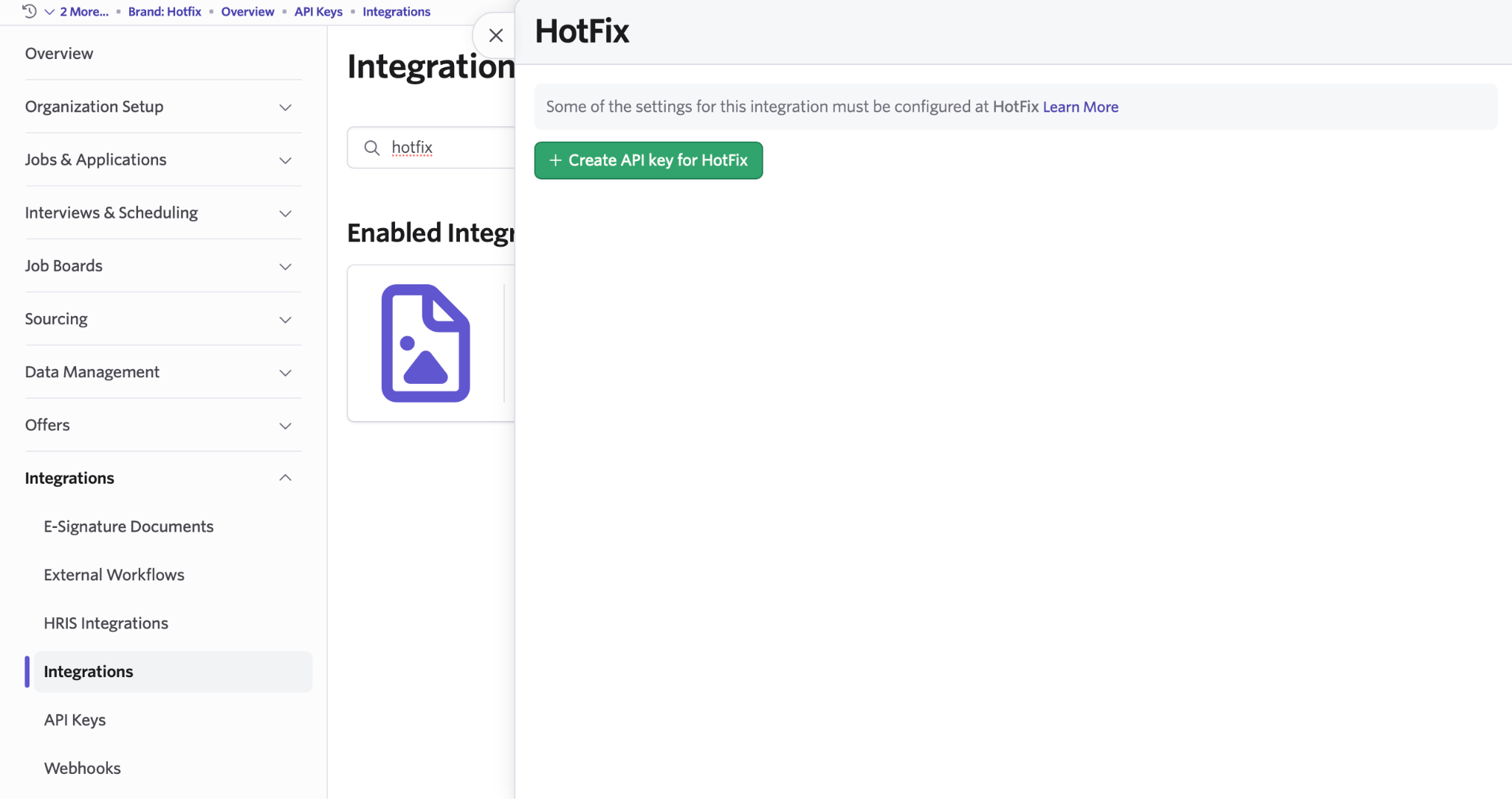
In Ashby Admin: Admin > Integrations > Hotfix > Create API key for Hotfix.
Copy the key when it appears. Ashby shows it only once.
Connect on Hotfix
Sign in to your Hotfix dashboard at hotfix.jobs/dashboard.
The connect form has a company picker and two credential fields:
- Find your company. Hotfix may already have a profile from a previous public job board ingest. Search the picker; if your company shows up, pick it. If not, type a new company name to create a fresh profile.
- Enter your company website. Drives your logo and the company profile.
- Enter your job board slug and API key from previous steps.
- As you type, Hotfix validates the API key against Ashby in real time. You should see “Credentials look good” within about a second.
- Click Connect. The integration is installed immediately. There is no approval queue.
Use the Hotfix integration with Ashby
Once the integration is live, Hotfix manages the day-to-day sync automatically. Sign in to your dashboard at hotfix.jobs/dashboard to manage everything in one place.
Job sync
Your first sync runs immediately on connect (about 30 seconds end-to-end). After that, Hotfix re-fetches your Ashby job board twice a day. New jobs you post appear on Hotfix on the next sync. Closed jobs are removed on the next sync.
Hotfix currently ingests US-based tech roles only. Roles posted outside the US, and non-tech roles such as clinical, retail, or frontline service jobs, stay in your Ashby workspace but don’t appear on Hotfix.
Hotfix uses AI to extract structured details from each posting (title, location, skills, years of experience, salary) and to classify whether it’s a tech role. If you spot a role that was filtered when it shouldn’t have been, or any other concern with how your jobs are being processed, contact us.
Each listing links to your company profile and appears in the relevant Hotfix searches, filters, and job alerts.
Candidate applications
When a candidate applies from Hotfix:
- Hotfix fetches the application form schema from Ashby (
jobPosting.info) and renders it inline, including custom questions, file uploads, and EEOC survey fields. - The candidate completes the form on Hotfix without leaving the site.
- Hotfix creates the candidate in your Ashby workspace, uploads the resume, submits the application, and writes any custom-field answers and EEOC survey responses.
- The candidate appears in Ashby with the Hotfix source attribution.
Where the data lands in Ashby:
- Candidate profile: standard fields and resume
- Application: custom-field answers
- Candidate Forms tab: EEOC survey responses (race, gender, veteran, disability)
Manage the integration
From the Integrations section of your dashboard, the Ashby card supports:
- Manage to rotate the API key or update the job board slug. Leave the API key empty to keep the existing one.
- Disconnect to turn off the integration. Hotfix stops syncing new jobs and falls back to redirecting candidates to your Ashby-hosted application page.
Additional resources
For questions not covered here, email integrations@hotfix.jobs.
Edit your company profile
The Company section of your dashboard lets you correct anything Hotfix’s enrichment got wrong, upload your logo, and edit your headline, description, industry, size, funding stage, headquarters, LinkedIn URL, work style, tech stack, and benefits. See the company profile guide for the full field list and how the profile is populated.
Manage your team
The Team section lists the approved admins and pending invites for your company. Any admin can invite a teammate by email; the invite is single-use, email-bound, and expires in 72 hours. Resending an invite to the same email auto-revokes the prior one. Revoking an invite from the list cancels it. There is no role hierarchy today: every admin can manage the integration, the company profile, promotions, and the team.
Promote your roles
From the Promote section, you can boost specific jobs to the top of relevant Hotfix search results and category pages. Connecting your ATS doesn’t affect organic ranking; promotion is a separate paid placement on top of the jobs your integration is already syncing. Pricing and details are on the Promote page.